Part 20/A — Self-Hosted Spotify on a Raspberry Pi: Finding Music You’re Allowed to Keep
Table of Contents
Part A: finding music you’re legally allowed to keep for a self-hosted library — where to actually get it, and why MeTube and YouTube ripping are the riskier appendix, not the main path.
 When the algorithm doesn’t have your playlist, you build the algorithm. — image generated via Nano Banana
Spotify has 100 million songs. It doesn’t have the one I actually want to hear. This is the first of three posts on how I replaced it with a small stack on a Pi: a place to put music I’m allowed to keep, an obsessive librarian that tags it correctly, and a server that streams it to my phone. This part is about the step most self-hosting posts skip, which is where the music legitimately comes from.
The pitch nobody makes for self-hosted music
Every self-hosting post about ditching Spotify leads with privacy. Fine, it’s true — Spotify builds a profile on every skip, every replay, every 2am sad-song binge. I care about that. But it’s not actually why I built this.
I built this because Spotify rents you access, and its catalog has a hole in it exactly the shape of what I listen to. Niche genres, small independent artists, netlabel releases that never made it onto a streaming service. A self-hosted library is the opposite of renting: files I keep, tagged my way, playable anywhere, with no profile built on every skip.
The catch is obvious. A library has to be filled, and how you fill it decides whether this is a fun weekend project or a liability. So this post starts with the sources where the answer is clearly yes. The other way, ripping from YouTube, is technically easy and I built it too, but it comes with legal questions, so it lives in an appendix at the end instead of the main path.
What “allowed” actually means
Three situations are clean:
- You bought it. A DRM-free purchase gives you a file for personal listening. Bandcamp, for example, hands you MP3, FLAC and other formats with a purchase.
- The rights holder offers it for free. A free or name-your-price release, or a download button the artist turned on themselves.
- A Creative Commons license covers it. Netlabels and similar publishers put the terms in writing, track by track.
And one assumption is not clean: “free to listen” is not “free to download and keep,” and “free to download” is not “free to reuse.” A free release is typically an authorized personal copy. For a private library that’s exactly what you want. It’s a limit on what you do afterward, such as redistributing it or putting it in a video.
A quick decoder for Creative Commons letters: BY means credit the artist, NC means non-commercial only, ND means no derivatives. Those restrictions are about sharing and reusing a track, not about keeping a private copy to listen to. That’s my reading of the licenses, not legal advice, so read the license on each track.
A popular name that isn’t on the list below: NCS. NoCopyrightSounds is a well-known label whose electronic music is all over YouTube, and the name makes it sound like the answer. It’s narrower than that. Its terms give independent creators a non-exclusive permission to use its tracks in their own videos and streams, on platforms like YouTube and Twitch, with credit. The permission is described as temporary and revocable, and all other rights are reserved. Nothing in it expressly covers keeping a personal copy in a music library, so I left NCS off the list. “No copyright claims” is a promise about claims on your videos, not a statement that the music has no copyright.
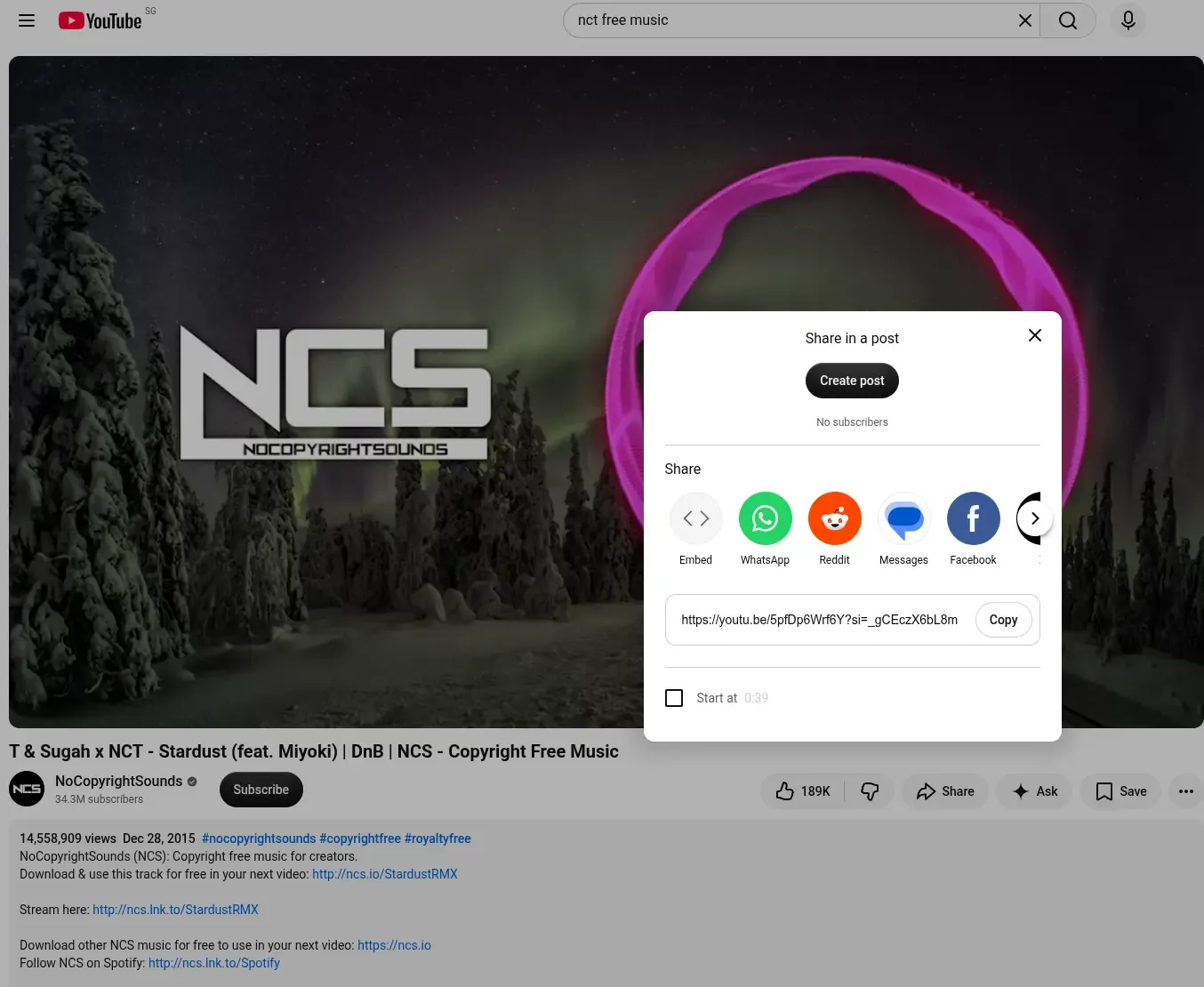 The NCS video description in question — generous permission for creators’ own videos, silent on a private library.
Where to get it
I read the terms and descriptions of these as of October 2026. Terms change, so treat each site’s own license page as the authority.
Bandcamp. Buying gives you a download in MP3, FLAC and other formats. Many artists also set releases to free or name-your-price, and some free downloads ask for an email address or a Bandcamp account. Free on Bandcamp is not automatically Creative Commons: the license line on those pages often says “all rights reserved,” which means the download is the artist’s offer, so treat it as a personal copy. Some artists spell out more. One French melodic-DnB producer’s profile says every track there is free to download and free to use in your own work, and asks you to get in touch if you want written clearance. That’s the kind of explicit statement to look for.
Free Music Archive. Every track carries its own Creative Commons license, shown on the download page. Older tracks may carry a “Download Only” license, which covers personal downloading and listening but not reuse. Free accounts have a daily download cap.
Jamendo. A large independent catalog. Since 2015 Jamendo Music has positioned itself as free streaming and download for private use, with a separate licensing marketplace for commercial use. Downloads need a free account.
Internet Archive’s Netlabels collection. Netlabels are labels built around free distribution under open licenses. Creative Commons describes the Internet Archive collection as free and open music, with most but not all of it under CC licenses, so check each release. Electronic netlabels exist there, for example Belgium’s Silenced, which Creative Commons lists as focusing on electronic releases.
Also worth a look: SoundCloud tracks where the artist enabled the download button, and ccMixter for Creative Commons remixes and samples.
A word on drum and bass. I haven’t measured how deep DnB runs on any of these, and I’d expect the selection to be thinner than YouTube’s. Bandcamp looked like the best bet when I searched: plenty of DnB releases with free or name-your-price downloads. Expect to hunt a little more than you would on a streaming service.
Keep a paper trail
$ mkdir -p /mnt/storage/music/licensesA short text file per release is enough:
artist:        <artist>
release:       <title>
source url:    <page you downloaded from>
downloaded:    <date>
license:       <CC BY-NC-ND 4.0 / free download by artist / purchased>
notes:         <anything the page said about reuse>
It takes thirty seconds per release and settles any later “wait, was that one allowed?” without guessing.
Architecture: one pipeline, no manual tagging
Music you're allowed to keep
(Bandcamp, netlabels, Jamendo, FMA ...)
        │   download in a browser, drop into temp/inbox/
        ▼
   ┌─────────┐      MusicBrainz + AcoustID fingerprint match,
   │  Beets  │ ───► correct tags, correct filename, correct folder
   └─────────┘
        │
        ▼
   ┌───────────┐
   │ Navidrome │ ───► scans library/, serves Subsonic API to your phone
   └───────────┘
Acquisition is just you, a browser, and a folder. There’s no software to run for that step, which is the point.
Beets is the strict librarian who won’t shelve a book until it’s catalogued. It reads existing tags, checks them against MusicBrainz, and fingerprints the audio via AcoustID/Chromaprint when tags are garbage. Part 20/B.
Navidrome is the quiet stagehand at the end, read-only and always on, serving the finished library over the Subsonic API. Part 20/C.
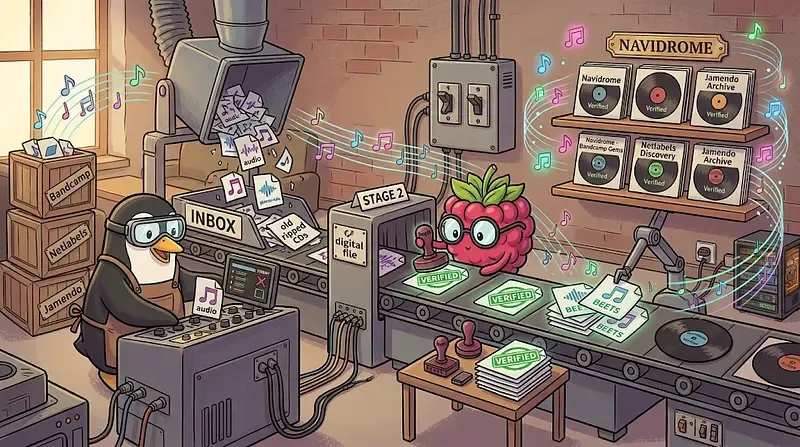 Legit crates in, obsessive librarian in the middle, tidy shelf at the end. — image generated via Nano Banana
The directory structure — set this up once, all three parts share it
$ mkdir -p /mnt/storage/music/library/beets
$ mkdir -p /mnt/storage/music/temp/inbox
$ mkdir -p /mnt/storage/music/temp/existing
$ mkdir -p /mnt/storage/music/config/{beets,navidrome}
$ mkdir -p /mnt/storage/music/licenses
$ chown -R 1000:1000 /mnt/storage/music
/mnt/storage/music/
├── library/
│ └── beets/ everything converges here
├── temp/ pending processing, nothing here is final
│ ├── inbox/ new downloads land here
│ └── existing/ an older collection, mid-migration
├── licenses/ the paper trail, outside the library
└── config/ container state, one tree, no exceptions
├── beets/
└── navidrome/Only library/ is ever scanned by Navidrome, so half-tagged files in temp/ stay invisible to it.
What’s next
The inbox is full of files you’re allowed to keep, tagged however each artist happened to tag them. Part 20/B is where the real work happens: Beets turns that into one properly organized library, including a genre bug so well hidden it took a raw database query to find it.
Appendix: the other way, with MeTube (technically feasible, may have legal consequences)
There’s a technically easy route that this series started with: MeTube, a web front-end for yt-dlp, pulls audio from YouTube and similar sites with a pasted URL. It works, and I built it. Then I looked properly at what the terms say, and it’s why it’s an appendix rather than step one. I’m keeping it because the setup is a good demonstration of reusing infrastructure from earlier posts, and because you should know it exists and what it risks. It’s not a recommendation to download anything you aren’t entitled to.
The legal picture
I’m not a lawyer, and this is not legal advice. This is what I found when I read the terms in October 2026: the YouTube terms dated December 15, 2023, and NCS’s current usage policy. Both can change, so check the live versions. It’s three separate questions, and it’s easy to blur them.
- YouTube’s Terms of Service. The current terms bar downloading or copying content unless the service expressly authorizes it, or you have prior written permission from YouTube (and from rights holders where relevant). They also separately bar circumventing features that restrict copying. A tool like MeTube is neither authorized by the service nor permitted by YouTube, whether or not you pay for Premium, because Premium’s offline mode is YouTube’s own in-app feature, not a license to use third-party downloaders. This applies to every video, including free-to-use music. Breaking a site’s terms is a contract matter between you and the site. Those terms let YouTube suspend or terminate accounts for material or repeated breach; beyond that, I can’t tell you how, or whether, they would act on it. The only download YouTube itself sanctions for music is the Audio Library’s own download button in YouTube Studio.
- Copyright. This depends on the specific track and on where you live. “Free to use” labels are narrower than they sound. NCS, described earlier, is the example: its permission was written for creators’ videos, not for a private library, so I’m not claiming that downloading its tracks from YouTube is clearly fine. DJ mixes and live recordings are not a safer category: a mix is built from other people’s recordings and compositions, most platforms don’t license DJ sets, and a live recording adds whoever recorded or broadcast it as another rights holder. Bootlegs and unofficial remixes are typically unauthorized derivative works. For an ordinary label release or someone else’s reupload, copying without authorization can be infringement, depending on your country’s rules.
- Anti-circumvention law. Some countries make it unlawful to bypass technical protection measures, separately from any copyright question, and this is where the picture is less comfortable than “just a ToS issue.” In 2020 the RIAA targeted youtube-dl on this theory and the EFF disputed it. In 2022 a US federal court sided with the RIAA in Yout v. RIAA, finding that the stream-ripping service had not plausibly shown that it avoids circumventing YouTube’s protection measure. That ruling is on appeal, and it was still pending in the latest reporting I found (April 2026). A German court has also granted the record industry an injunction against someone hosting youtube-dl, and the industry reports successful actions against stream-ripping sites in a long list of other countries. These cases targeted services and software hosts rather than private users, and I found no report of an individual being pursued for private stream-ripping. That is not a guarantee, and whether a private user’s own act is covered was described as untested when this came up in 2020. I found nothing newer either way.
The disclaimer, plainly: this appendix is a technical demonstration of what you can build by wiring open-source tools together. It is not encouragement to download anything you aren’t entitled to, and it isn’t advice on what you may legally do. I don’t host, share or redistribute any of the files; the setup is private and single-user. What you download, and whether it’s lawful where you live, is your responsibility. Read the terms of the service and of the content owner, check your local law, and ask a lawyer if the answer matters to you.
MeTube — the delivery guy
services:
  metube:
    image: ghcr.io/alexta69/metube:latest
    container_name: metube
    restart: unless-stopped
    environment:
      - UID=1000
      - GID=1000
      - DOWNLOAD_DIR=/downloads
      - STATE_DIR=/downloads/.metube
      - TEMP_DIR=/downloads/.tmp
      - OUTPUT_TEMPLATE=%(title)s.%(ext)s
      - 'YTDL_OPTIONS={"format":"bestaudio/best","writethumbnail":true,"postprocessors":[{"key":"FFmpegExtractAudio","preferredcodec":"best"},{"key":"FFmpegMetadata","add_metadata":true},{"key":"EmbedThumbnail"}]}'
    volumes:
      - /mnt/storage/music/temp/ytm:/downloads
    networks:
      pi_docker_network:
        ipv4_address: 172.30.1.51

networks:
  pi_docker_network:
    external: true
Two gotchas I hit directly:
YTDL_OPTIONS must be single-quoted — unquoted, the leading { breaks YAML parsing with an error that tells you nothing useful.
Don’t set user: alongside UID/GID. MeTube’s own wiki documents this: the entrypoint needs root momentarily to read those vars and drop privileges via gosu, including chowning the download directory on the way down. Force user: "1000:1000" and that step never runs — the vars go silently inert.
preferredcodec: "best" remuxes YouTube’s native lossy stream with zero re-encoding. I grabbed one track as FLAC out of habit and immediately regretted it: YouTube’s source is always lossy Opus/AAC, so FLAC just faithfully preserves every compression artifact at 5–10x the file size, for identical audible quality. Worse than doing nothing.
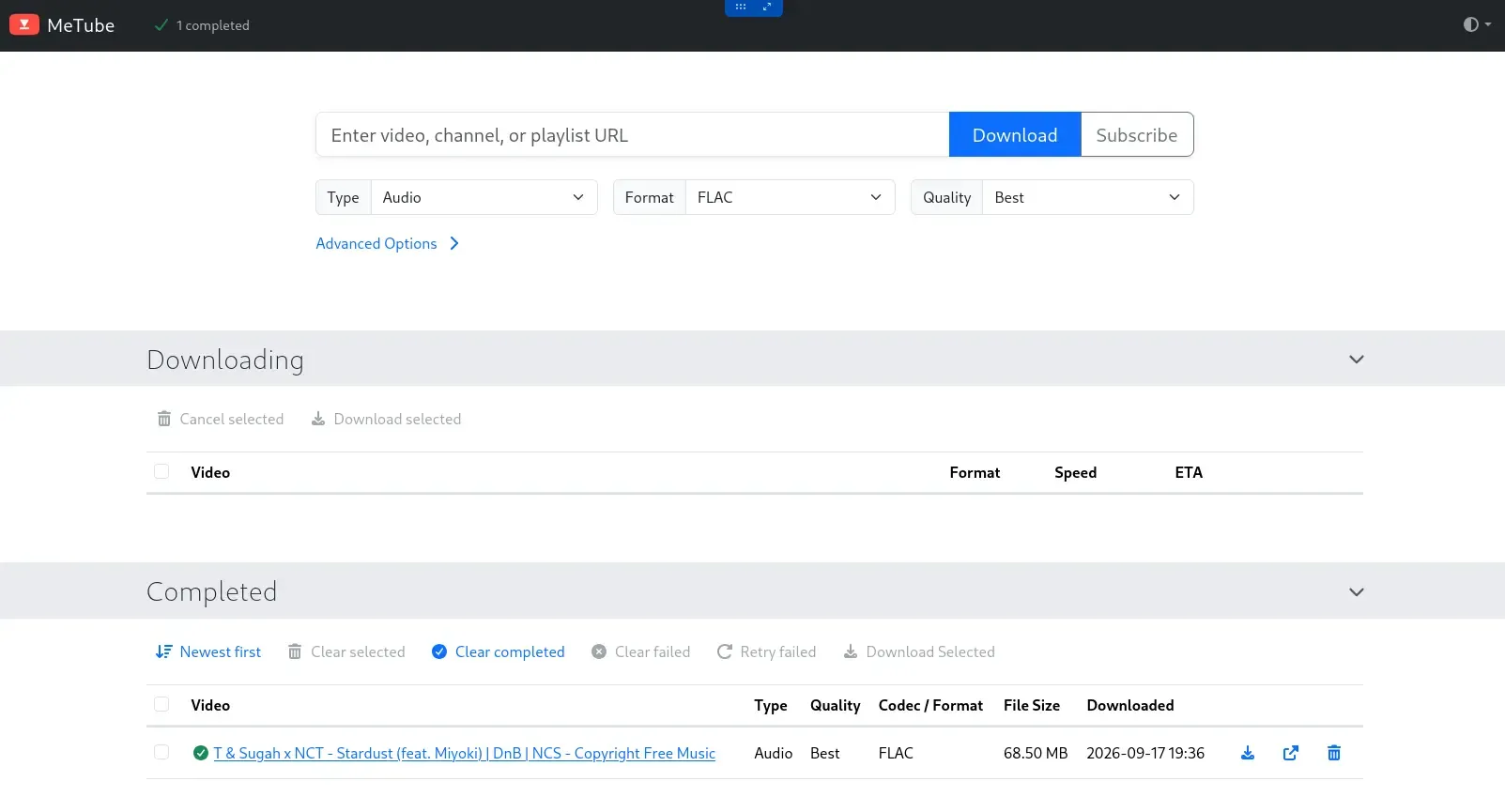 The FLAC mistake, immortalized — 68.5 MB for audio that was never lossless to begin with - For demonstration/education purpose only! Ripped song was deleted afterwards.
The artist-splitting rabbit hole (and why I climbed back out)
Here’s a real problem this pipeline hits constantly: an aggregator channel uploads someone else’s track, and yt-dlp has no way to know the channel isn’t the artist.
uploader: Bass Radio Weekly         ← the channel that posted it
title:    Rival - Wanderer          ← the actual artist, sitting right there in the title
My OUTPUT_TEMPLATE originally fell back to uploader whenever artist was empty, so every track from an aggregator channel got filed as Bass Radio Weekly - Rival - Wanderer.opus. Wrong artist, doubled text.
The fix looked obvious: yt-dlp has a MetadataParser postprocessor built exactly for this — split title on the Artist - Title pattern, before the filename is even decided:
{"key": "MetadataParser", "when": "pre_process", "actions": ["title:%(artist)s - %(title)s"]}I tested it the responsible way — MeTube’s own docs explicitly recommend debugging postprocessing directly in yt-dlp before trusting it in the app:
$ docker exec -ti metube sh
$ yt-dlp --parse-metadata "title:%(artist)s - %(title)s" -x --audio-format best "https://youtu.be/..."
Worked perfectly. [MetadataParser] Parsed artist from '%(title)s': 'Rival', right there in the log.
Then I put the same JSON into MeTube’s actual config and it broke on the very first real download:
File "/usr/local/lib/python3.13/site-packages/yt_dlp/postprocessor/metadataparser.py", line 13, in __init__
    assert action in self.Actions
AssertionError
Here’s why the CLI test lied to me. --parse-metadata on the command line works because yt-dlp’s argument parser converts my string into an internal object — (Actions.INTERPRET, 'title', regex) — before the postprocessor ever sees it. MeTube skips that conversion entirely; it hands JSON straight into yt-dlp’s Python API. My plain string arrived unconverted, Python’s iterable unpacking shredded it into single characters, and the first character obviously wasn’t a valid action. The CLI test proved the idea worked. It never touched the actual code path MeTube uses.
I pulled the preset and stopped fighting it. The real fix needed no postprocessor at all:
OUTPUT_TEMPLATE=%(title)s.%(ext)sTrust title directly — in practice it’s usually already clean, aggregator contamination and all lives in uploader, not title. And instead of trying to make MeTube correct the embedded artist tag too, I pushed that job to where it already belonged: Beets. MeTube fetches. Beets corrects. I’d briefly forgotten my own architecture — more on that in Part 20/B.
A tell worth knowing: some uploads need zero fixing
Look at the file’s own metadata before assuming it needs work:
synopsis: Provided to YouTube by [Distributor]
Wanderer · Rival
℗ [Label Name]
Released on: 2026-03-14
“Provided to YouTube by X” in the description means this came through Content ID from the rights-holder’s own metadata feed, the same delivery pipeline that stocks the big streaming services. Those uploads arrive with correct artist, album, and album_artist already populated, no parsing needed.
Fronting MeTube: nginx + the mTLS gate
Worth being honest before diving in: full mTLS is arguably overkill for a tool whose worst-case failure mode is “someone queues junk downloads.” A simpler auth_basic username/password would cover the actual risk here just fine, with far less client-side friction than a certificate. I’m not doing this because MeTube specifically demands it — I’m doing it because the earlier posts already built everything this needs: Part 16 set up the nginx reverse proxy with mutual TLS as the zero-trust layer, the mTLS deep-dive built CertWiz-mTLS, the toolkit that issues the client certificates, and Part 19 automated the wildcard certificate sitting underneath all of it. The real point of this section is showing that none of that was a one-off. Once the shared ssl.conf/proxy.conf pattern and the CA exist, wiring a brand-new service into it is a handful of lines, not a project — that reusability is worth demonstrating even on a service that didn’t strictly need the strongest option available.
MeTube has no login of its own — anyone who reaches it can queue arbitrary downloads onto the Pi’s disk. That’s the write-capable, zero-auth profile that gets the mTLS treatment here, mostly because it was free to add.
Rate-limit zone in the shared nginx.conf — test before reload, always:
limit_req_zone $binary_remote_addr zone=metube:10m rate=10r/s;The vhost, conf.d/metube.conf:
server {
  listen 80;
  server_name "metube.yourdomain.tld";
  return 301 https://$host$request_uri;
}

server {
  listen 443 ssl;
  http2 on;
  server_name "metube.yourdomain.tld";

  include /etc/nginx/ssl.conf;
  ssl_protocols TLSv1.2;
  include /etc/nginx/conf.d/bot-defense.inc;

  ssl_verify_client           on;

  location / {
    limit_req zone=metube burst=20 nodelay;
    proxy_pass   "http://172.30.1.51:8081";
    include /etc/nginx/proxy.conf;

    access_log on;
    access_log /var/log/nginx/access_metube.log;
    error_log on;
    error_log /var/log/nginx/error_metube.log;
  }

  location = /robots.txt {
    alias /usr/share/nginx/html/robots.txt;
    allow all;
    log_not_found off;
    access_log off;
  }
}
Because ssl.conf already carries the domain’s certificate and the mTLS trust anchors globally, every new vhost gets mTLS-ready for free — enforcing it here is exactly one line.
War story #1 — the duplicate directive
My first pass tried to stretch the timeout past proxy.conf’s shared 240s for long downloads by declaring proxy_read_timeout again after the include:
nginx: [emerg] "proxy_read_timeout" directive is duplicate in /etc/nginx/conf.d/metube.conf:25Unlike add_header, this directive doesn’t cascade — two declarations in one block is a hard error. Fix: drop the override entirely and stay on proxy.conf’s shared value.
War story #2: the client certificate that worked everywhere except Android
Installing a CertWiz-mTLS client certificate onto my phone hit one more wall: Firefox on Linux accepted it fine with an empty password; Android’s installer rejected the same file as “wrong password” no matter what I typed, including nothing. An IPFire community thread turned out to have the identical complaint. The real cause: OpenSSL 3.x changed the default encryption inside .p12 files to AES-256-CBC; Android’s certificate importer still expects the older RC2/3DES scheme, and its generic error for “I can’t parse this file” is the same as its error for “wrong password.” Re-exporting with the legacy cipher fixed it in one shot:
$ openssl pkcs12 -export -legacy \
  -in client.crt -inkey client.key -certfile ca.crt \
  -out client.p12 -passout pass:something-simple