
Part 2 — Meet Git-Kepo Pro: Upgrading My Singlish AI Agent to a Level That Feels Borderline Illegal
Table of Contents
Part 2 of the Git-Kepo series. How I upgraded a Singlish-speaking repo analyst from “promising but unreliable” to a proper diagnostic tool — by fighting Ollama context limits, splitting tool files to save tokens, and teaching it to read network patterns across 12 programming languages.
In Part 1, I introduced Git-Kepo — a kaypoh git detective that clones your repos, runs diagnostics, scans for credential leaks, and labels your projects. It spoke Singlish, called me Boss, and refused to write code (“not my department lah”). The personality was on point. The concept was solid. The execution was… let’s say it had character flaws.
Sometimes Git-Kepo would start a task, say “let me check, one sec” — and then go completely silent. It would show me the commands it planned to run as nice code blocks in the chat, then never actually run them. It would lose track of which repo it was analysing mid-scan. And when it did complete a task, it would sometimes throw in a credential audit when I only asked for a label, wasting time and tokens on work nobody requested.
In other words, Git-Kepo was like a fresh intern — eager, opinionated, wearing the right uniform, but couldn’t actually finish a task without wandering off to make kopi ah.
This post is about turning that intern into a senior analyst. Same personality, same Singlish, same attitude. But now it actually finishes what it starts.
 Git-kepo Pro — Image generated via Nano banana
The Model Problem
The original Git-Kepo ran on Gemma4:26B — a Mixture-of-Experts model with 4B active parameters. For casual chat agents like my Uncle Ah Huat, small MoE models are fine. But Git-Kepo’s job is different. It needs to run shell commands, read the output, decide what to do next, classify findings, and report back — all without losing track of the conversation. That’s agentic work, and it needs a model that can sustain multi-step tool calling without dropping the thread and Gemma4 turned out to be less agentic.
The model hunt went something like this:
Gemma 4 26B (original) — fast, but kept going silent mid-task. The thinking mode had a known issue where it sometimes engaged even when disabled, eating output tokens. The maxTokens: 4096 ceiling in the config meant the model ran out of budget just showing me its plan.
Qwen 3.6 35B-A3B — strong contender. MoE architecture (only 3B active parameters), specifically built for agentic coding with thinking preservation across multi-step workflows. The 35B total parameters give it a broad knowledge base while keeping inference fast. Available on Ollama with good community support.
Qwen 3.5 27B — the dense alternative. All 27 billion parameters active on every token, meaning better instruction following and stronger persona consistency than MoE models. Slower per token, but more reliable on complex tasks.
Qwen 3.5 122B — the big one. 122B MoE with 10B active parameters. Needs around 80GB of VRAM, which sounds absurd but I had a short chance to try a beefy machine. This is the model that competes with frontier-class proprietary models while staying fully local.
GLM-4.7 — designed specifically for long task cycles, frequent tool calling, and production stability. Scored highest among open-source models on agent benchmarks. But the full version was cloud-only on Ollama — only the Flash variant (30B MoE) was available locally.
I went with Qwen 3.5 122B. The reasoning quality is noticeably better than the 26B-35B class — it doesn’t lose track of multi-step tasks, it follows the .md file instructions more precisely, and it holds the Singlish persona without drifting into generic assistant mode.
For anyone without data centre hardware: Qwen 3.6 35B-A3B is the sweet spot. Fast inference (3B active parameters), strong agentic coding benchmarks, 24GB on disk with Q4 quantisation, and runs on a single consumer GPU.
The Context Limit That Broke Everything
Here’s the bug that took the longest to find. Git-Kepo would start a task, run one or two commands, and then go completely silent. No error message, no explanation — just radio silence in Matrix.
The Ollama debug logs told the story:
context limit hit - shifting kv cache removal unsupported,
clearing cache and returning inputs for reprocessing
The context was hitting 16,384 tokens and getting dumped. But my NemoClaw config had contextWindow: 131072. Where was the 16K limit coming from?
Turns out, my Ollama Docker container had this environment variable:
- OLLAMA_CONTEXT_LENGTH=16384This overrides whatever the model or client requests. With 16K total context, the agent’s identity files (SOUL.md, AGENTS.md, TOOLS.md, IDENTITY.md) alone consumed a significant chunk. Add the chat history, the tool call results from git commands, and there was barely any room left for the model to think, let alone generate a multi-step response.
The first fix bumped it to 65K:
- OLLAMA_CONTEXT_LENGTH=65536This worked for single-repo analysis. But when I started running batch mode — multiple repos in one session — the context filled up again. A full scan on one repo generates 15+ tool calls, each with output. Three repos triples that. The Ollama logs showed the same error, now at the 65K ceiling:
context limit hit - shifting id=0 limit=65536 input=65536On the resource hardware I had access to, the final fix was straightforward:
- OLLAMA_CONTEXT_LENGTH=131072But a bigger context window is only half the solution. The agent also needed to stop dumping raw command output into the conversation. A git log that returns 200 lines doesn’t need 200 lines in the chat - the agent should read it, extract what matters, and report a concise summary. This led to the Context Management rules in TOOLS.md: summarise instead of passthrough, save detailed data to REPOS.yaml, and warn Boss when context is getting full.
 Context window troubleshooting — image generated with Nano banana
Combined with bumping maxTokens from 4096 to 16384 in the agent’s models.json (so each individual response can be longer), and enabling reasoning: true (so the model plans its steps before acting), Git-Kepo went from “one sec… silence” to actually completing full diagnostic scans without going silent.
One gotcha with
models.json: the file sits at~/.openclaw/agents/main/agent/models.jsoninside the sandbox and is writable by the sandbox user - so you’d think editing it directly would be the quick fix. It is, until the next Matrix session starts. Every time Git-Kepo joins a room or a new session begins, OpenClaw regeneratesmodels.jsonfrom the immutableopenclaw.json, resettingreasoningback tofalseandmaxTokensback to 4096. Your careful edits vanish. If this becomes a real burden, the proper fix is setting these parameters in the Dockerfile’s Python script that generatesopenclaw.jsonbefore building the image - that way they’re baked in and survive every session reset. However, as you will see, it works quite well sia - the context window fix on the Ollama side was the real game changer, and the occasionalmodels.jsonre-edit after a session reset is a minor annoyance compared to the silent failures we had before.
The lesson: always check the Ollama server-side context limit. Your model config might say 131K, but if the server caps it at 16K, the server wins. And when you scale to batch mode, even 65K might not be enough — match your context window to your workload.
Teaching Git-Kepo to Actually Run Commands
Even after fixing the context limit, Git-Kepo had another habit: it would show me the commands it planned to run as formatted code blocks in the chat, say something like “let me execute these”, and then… not execute them. The model was treating the commands in TOOLS.md as content to display rather than instructions to act on.
The fix was a new rule in TOOLS.md:
## HOW TO RUN COMMANDS
Never show Boss the commands you plan to run. Just run them.
Use the exec tool to execute commands directly. Do not paste
commands as code blocks in chat. Boss wants results, not plans.
Simple, blunt, and effective. Combined with the “NEVER GO SILENT” rule (every tool call must be followed by a message with results), Git-Kepo now runs commands and reports findings instead of presenting a PowerPoint of its intentions.
The Three Diagnostic Toolkits
As Git-Kepo’s capabilities grew, the tools naturally fell into three domains. Each one works differently and deserves its own explanation.
Git Diagnostics
This is Git-Kepo’s original purpose, inspired by Ally Piechowski’s article about running git commands before reading code. Five git one-liners that produce a diagnostic picture of any repository: git log with sort/uniq to find churn hotspots (which files change the most), git shortlog to calculate bus factor (who owns the code), git log filtered by bug-fix keywords to find where bugs cluster, commit frequency by month to gauge project velocity, and a grep through recent commits for reverts and hotfixes to measure firefighting frequency. The agent runs each command via exec, reads the output, cross-references the results (high churn + high bug count = KNS), and produces an opinionated summary. None of this requires reading source code - it’s pure git history analysis.
 Adding three diagnostic tools — image generate with nano banana
Credential Leak Audit
This goes beyond what the original article covered. Five steps: scan tracked files for things that should never be committed (.env, .pem, .key), verify .gitignore coverage, grep file contents for known API key patterns (AWS AKIA, OpenAI sk-, GitHub ghp_, Google AIza, plus generic password= and api_key= assignments), search commit history for messages suggesting credentials were pushed and then removed (“remove key”, “accidentally”, “oops”), and check for deleted .env files still recoverable from git objects. The agent classifies each finding as PLACEHOLDER, SUSPICIOUS, or LIKELY REAL using its own judgment - it can tell that AKIAIOSFODNN7EXAMPLE is AWS’s documentation dummy and that config['api_key'] is code loading a credential, not a credential itself.
When it finds a commit that removed a hardcoded key, it runs git show on that commit and extracts the actual credential value from the diff’s - lines - unredacted, so Boss can verify whether it’s still active and rotate it. I learned the hard way that filtering git show by file extensions misses template files like .j2 (Jinja2) - and that the a/ and b/ prefixes in diff paths are formatting, not real paths. Both gotchas are documented in TOOLS_CREDENTIALS.md so the agent doesn’t repeat them (more about this file later ah).
 Another test repo having leaked credentials — Git Kepo rulz
Repo Labelling
The goal: classify what a repository is without reading source code. Git-Kepo reads the README, finds all package manifests across the repo (using find to catch manifests in subdirectories like backend/requirements.txt or frontend/package.json, not just the root), reads Docker and infrastructure files, checks CI/CD configs, and glances at directory structure. From these surface files alone, the agent produces a short description, a set of software engineering labels/tags (like rest-api, microservices, docker, websocket), tech stack summary, architecture type, deployment method, and a 2-3 sentence summary.
 Repo labeling — image generate via nano banana
The labelling is a standalone task - when Boss says “label this”, the agent only runs labelling. No credential audits, no git diagnostics, just the classification. This keeps it fast and focused.
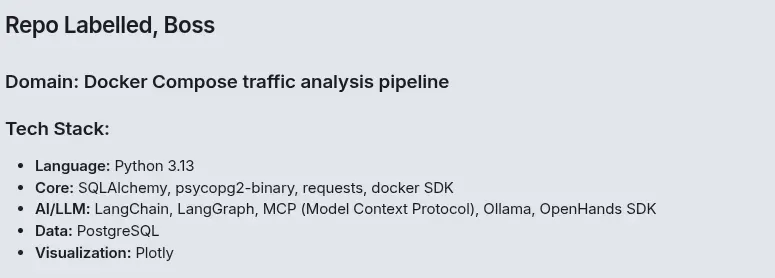 Labelling a repo — quite nice leh
Splitting TOOLS.md to Save Tokens
As these three toolkits grew, TOOLS.md became massive. That’s a lot of context to load on every single interaction — even when Boss just wants to check the churn on a repo and doesn’t need 200 lines of credential audit patterns.
The solution: split TOOLS.md into a master file with shared rules and three sub-files, one per toolkit.
TOOLS.md(master): General rules, context management, repo tracking, batch processingTOOLS_DIAGNOSTICS.md: 5 git diagnostic commandsTOOLS_CREDENTIALS.md: 5-step credential audit with recoveryTOOLS_LABELLING.md: Repo labelling and surface file analysis
The master file contains the rules that apply to all tasks: general git rules, the “never go silent” policy, “how to run commands”, task scope enforcement, repo tracking (REPOS.yaml format), context management, and batch processing flow. It also has a jump table telling the agent which sub-file to read for which task.
When Boss says “label this repo”, the agent loads only TOOLS.md + TOOLS_LABELLING.md. When Boss says “churn”, it loads only TOOLS.md + TOOLS_DIAGNOSTICS.md. Only a “full scan” loads all four files. Every line of irrelevant tool instructions you can keep out of context is more room for the actual work.
Scope Enforcement and the Task Mixing Problem
One persistent issue: when Boss asked for a label, Git-Kepo would sometimes throw in a credential scan for good measure. Helpful in theory, annoying in practice — it doubles the execution time for work nobody requested.
The fix is explicit task scope rules in TOOLS.md:
Each task is independent. When Boss asks for one thing, do only that thing:
- "label this" = run labelling only. Do NOT run credential audit.
- "secrets" = run credential audit only. Do NOT run labelling.
- "full scan" = run everything. This is the ONLY command that runs all tasks together.
This is reinforced in IDENTITY.md
I do only what Boss asks for. Label means label. Secrets means secrets. I don’t add extras.
and in AGENTS.md’s command routing table. Triple enforcement, because models need to hear the same rule from multiple sources before they consistently follow it.
Repo Tracking, Deduplication, and Batch Mode
Git-Kepo maintains a persistent YAML file at /sandbox/.openclaw-data/workspace/REPOS.yaml. Every analysed repo gets an entry with its URL, short description, labels, tech stack, architecture, deployment, credential status, and a 2-3 sentence summary. I chose YAML over markdown because it’s trivially parseable - you can load it in Python with yaml.safe_load() and filter repos by label, credential status, or any other field.
The format is a flat list — no “last analysed” or “history” sections. New entries append at the bottom. Simple, predictable, easy to grep.
repos:
  - url: https://github.com/example/auth-service
    date: 2026-04-24
    short_description: "OAuth2 authentication microservice"
    labels: [auth, security, microservice]
    stack: "TypeScript / Express / PostgreSQL"
    architecture: microservices
    deployment: docker-compose
    credentials:
      status: suspicious
      details: "Found AWS_SECRET_KEY in README.md line 15, appears to be placeholder but format matches real key pattern"
    summary: "Auth service with Stripe integration. .gitignore CMI - got three placeholder credentials in README that look like real keys."
Before analysing any repo, Git-Kepo checks REPOS.yaml for duplicates. If the repo URL already exists, it shows Boss the stored data and says: “Boss, this repo was already analysed on
After completing a repo’s analysis and updating REPOS.yaml, Git-Kepo deletes the cloned repo from /tmp/git-repos/. The data is in REPOS.yaml - the cloned files are no longer needed, and cleaning them up frees disk space and helps with context management during batch runs.
 Batched run and repo tracking — Image generated via nano banana
Batch mode follows the same principle: Boss pastes multiple repo URLs, Git-Kepo processes them sequentially. After each repo, it reports a concise summary and moves to the next immediately — no waiting for Boss to prompt it. If a clone fails, it skips and continues. The critical rule: “Move to the next repo immediately. Do NOT wait for Boss to prompt you.” Without this explicit instruction, the agent would complete one repo and then wait politely for the next message, defeating the entire purpose of batch processing.
Context Management — The Silent Killer
Even with 131K context, batch mode can eat through tokens fast. A full scan on one repo generates 15+ tool calls. The raw output from git log, git grep, and git show can be enormous. If the agent dumps all of that verbatim into the conversation, context fills up and the model goes silent mid-batch.
The context management rules in TOOLS.md address this directly:
- Be a filter, not a pipe. Read the raw command output, extract findings, report the summary. Don’t copy-paste 200 lines of grep output into the chat.
- Data is saved in
REPOS.yaml. Once the summary is written to the YAML file, the detailed data doesn’t need to live in the conversation. - Warn before hitting the ceiling. If context is getting full with repos still to process, the agent tells Boss proactively:
Context getting full. Recommend resetting session after this batch. Results are saved in REPOS.yaml.
This was a lesson I learned the hard way. The first batch run of three repos hit 65K context after two repos and went silent on the third. The model didn’t crash — it just had no room left to generate output. The fix wasn’t just more context (though that helped). It was teaching the agent to manage what it keeps in the conversation.
The Singlish Upgrade
While we were at it, Git-Kepo’s vocabulary got a proper expansion. The original had the basics — lah, leh, lor, meh, sia. The Pro version adds 20+ Singlish words, each with a git-analysis context example:
guai lan for repos with deliberately awkward structure. cheem for complex microservice architectures. rabak for chaotic commit histories. CMI (cannot make it) for a .gitignore that misses all the important patterns. atas for repos with Kubernetes, Istio, and service mesh (“wah, damn atas”). swee for perfect scan results. kena for repos that got hit by the classic .env leak. gao dim for when the audit is done and everything’s clean. no eye see for commit histories too ugly to look at.
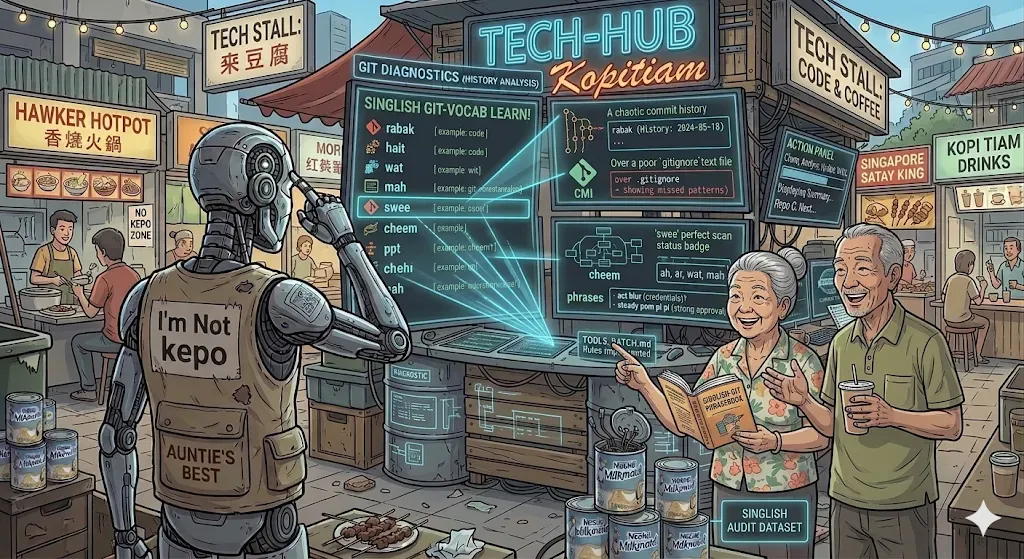
Plus the one/wan interchangeable spelling, four new particles (ah, ar, wat, mah), and the full range from steady pom pi pi (strong approval) to act blur (pretending not to know about those credentials that were pushed three months ago).
 A short summary of the repo — Singlish preserved
What Changed From v1 to Pro
For anyone upgrading from the original Git-Kepo:
- Model: Gemma 4 26B -> Qwen 3.5 122B (or Qwen 3.6 35B for consumer hardware)
- Ollama config:
OLLAMA_CONTEXT_LENGTHbumped from 16K to 131K.maxTokensbumped from 4096 to 16384.reasoningenabled.OLLAMA_REQUEST_TIMEOUTincreased to 600 seconds for long multi-step analyses. - New capabilities: Credential recovery (extracts actual key values from git diffs, unredacted), repo labelling with surface file analysis and software engineering tags, batch mode with deduplication, persistent repo tracking in YAML format, context management rules.
- Reliability fixes: “Never go silent” rule, “how to run commands” rule (execute, don’t display), task scope enforcement,
TOOLS.mdsplit into four files to conserve context tokens, context management to prevent mid-batch silence, auto-cleanup of cloned repos after analysis. - File format changes:
REPOS.mdreplaced withREPOS.yamlfor easy parsing. Flat list structure, no last/history sections. Duplicate detection before analysis. All paths use absolute/sandbox/.openclaw-data/workspace/and/tmp/git-repos/. - Files:
TOOLS.mdsplit intoTOOLS.md(master), TOOLS_DIAGNOSTICS.md,TOOLS_CREDENTIALS.md,TOOLS_LABELLING.md.SOUL.mdexpanded vocabulary.AGENTS.mdupdated with absolute paths, new reset commands, file path reporting, duplicate check rule.IDENTITY.mdupdated with labelling capabilities and cleanup commands.
What’s Next
Git-Kepo Pro handles git diagnostics, credential auditing, and repo classification. Adding more capabilities is straightforward — write a new TOOLS_ file, add a few lines to the command routing in AGENTS.md, and the agent has a new skill. The architecture scales. Really the limit is the sky…I mean, the context window!
 Almost the sky is the limit — Image generated via nano banana
That’s the real constraint. Every new capability means more tool instructions, more grep patterns, more interpretation guidance. And every token spent on “here’s how to scan for license conflicts” is a token that can’t be used for “here’s what I found in your repo.” You can have an agent that knows how to do 47 things, or an agent that actually finishes doing 3 things before going silent. We chose the latter. For now.
Some ideas sitting in the backlog:
Dependency vulnerability scanning — cross-reference package manifests against known CVE databases. Your code might be clean, but that npm package you installed in 2022 might not be.
License auditing — scan dependency trees for license conflicts. Nothing ruins a Friday like discovering your MIT-licensed project transitively depends on a GPL library.
Code complexity hotspots — cross-reference churn data with file sizes and function counts. The file that changes the most AND is the longest AND has the most nested functions? That’s not a file, that’s a cry for help.
Multi-repo comparison — analyse a fleet of repos and produce a comparative report. Which ones are healthy, which are dying, which have credentials sitting in git history that nobody rotated.
The food court keeps growing. Uncle makes kopi. Auntie cleans and judges. Git-Kepo digs through your repos, finds the problems, and tells you in Singlish exactly how KNS the situation is.
Your agent. Your model. Your repos. Your detective. Your context window limit.
Git-Kepo became so good at finding leaked credentials that publishing its identity files felt irresponsible — like giving everyone a metal detector and a map to your beach. The NemoClaw foundation guide is here. Git-Kepo v1 is in Part 1. If you want the
.mdfiles to build your own kaypoh detective, drop me a message. I promise I won’t scan your repos first. Probably.